 M10 Docs
Bars.Beats.Ticks.Micros
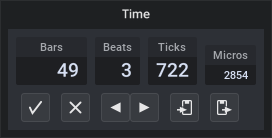
Musical positions and lengths are expressed as Bars.Beats.Ticks.
For example, position 17.3.480 means the 17th bar, the 3rd beat within that bar, 480 ticks from the start from that beat.
A length of 0.2.720 means a length of 2 beats and 720 ticks.
There are 960 ticks per beat (= per quarter-note). So a "1/16th", which is 1/4th of a beat, is 240 ticks.
At a tempo 120 BPM every tick corresponds to 0.521 ms.
That's good for MIDI sequencing but not good enough for audio sequencing.
That's why MuLab uses an even deeper sub-division called microticks.
There are 4800 microticks per tick so at 120 BPM there are 9216000 microticks per second = 0.108507 microseconds per microtick.
At 60 BPM that's 0.2170 microseconds per microtick.
For reference: At a samplerate of 48 kHz each sample lasts 20.83 microseconds. At samplerate 192 kHz a sample lasts 5.21 microseconds.
So MuLab's ultra-fine microtick resolution supports sample accurate audio sequencing even at a high samplerates and low tempi. With extra margin for the future.
The time signature is defined by the composition and can be edited via the composition's context menu -> Properties.
By default, there are 4 beats in a bar.
Notes
- You can edit a position or length by dragging the values up/down, by using the mouse wheel, by clicking the previous/next grid position buttons.
- In the above shown time dialog you can also directly type a time like "5.4.480".
Upon typing the "5" (ie. the first numeric character) an string entry automatically pops up where you can complete the input value. - When double-clicking the value can be edited in the most precise Bars.Beats.Ticks.MicroTicks format.
- When typing a new value you don't need to type the complete Bars.Beats.Ticks.Micros format, your input is interpreted left to right.
So when you type 45 it will be interpreted as bar 45.
When you type 45.3 it's bar 45, 3rd beat.
When you type 45.3.600 it's bar 45, 3rd beat, 600 ticks.
When you type 45.3.600.2780 it's bar 45, 3rd beat, 600 ticks, 2780 microticks. - You can Alt+click the right arrow to set the value to infinity. Or right-click -> Set Infinite.